Working with Key Pairs
Video Guide
Document Guide
Step 1:
-
Navigate to the Key Pairs menu under Compute.

-
Click on the Plus sign create button below the breadcrumb navigation to open the creation wizard.
-
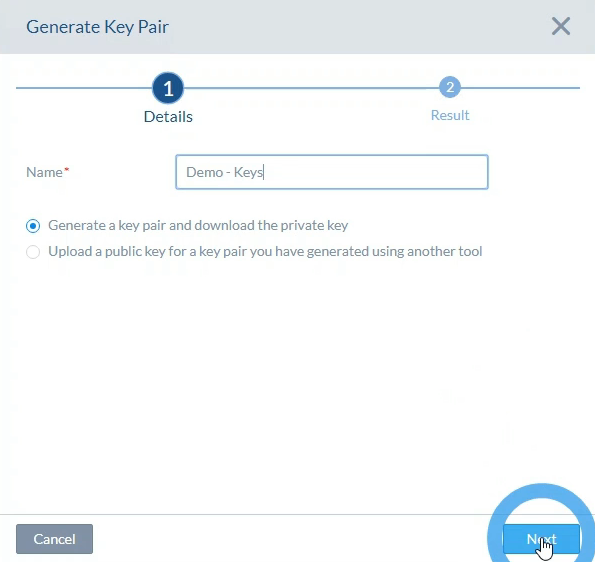
Name this Key Pair.
-
From the radio button set, select whether to generate a Key Pair, or to upload an existing SSH-2 RSA public key.
-
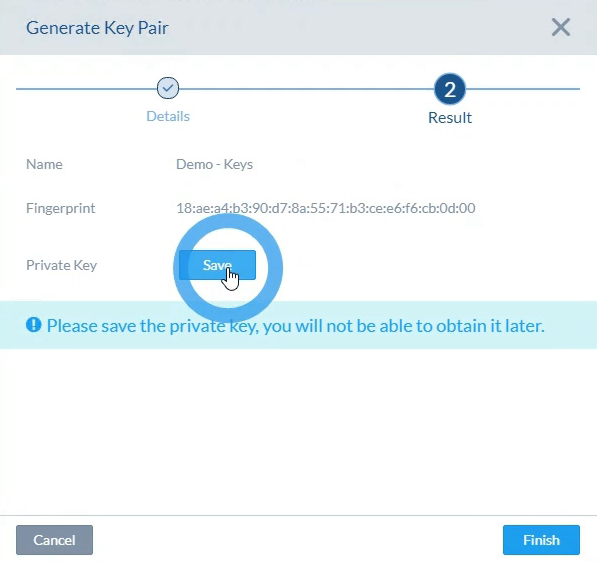
Clicking next with generate 'Key Pair' selected opens a menu to download a .pem of this key.
-
Click the 'Save' button in the center of the menu to save this .pem key.
Step 2:
-
Open PuTTYgen from your computer, and then click on import key under the conversions drop down menu.
-
Select the downloaded *.pem key.
-
Click on save public key and save private key to save your keypair (keep your private key safe!).
-
This key pair may be used to connect to (private key) and configure (public key) cloud images.
